Table of contents
Cloud storage and file transfer services can both put a download link in someone’s inbox. The difference shows up later. Do you need the file to remain organized, editable, and available across devices, or do you only need to deliver it and move on?
This cloud storage vs file transfer comparison focuses on that practical split. It does not assume that one category is always safer, cheaper, or faster. Those results depend on the provider, plan, settings, file size, network, and how long the recipient needs access.
The short answer
Choose cloud storage when the files should remain part of a working library. It suits ongoing access, folder organization, repeated sharing, collaboration, and keeping a current copy available from more than one device.
Choose a file transfer service when the job is delivery. It suits a finished video, archive, design export, or document package that one or more recipients need to download, after which the sender can remove or let the link expire.
NIST defines cloud computing as on-demand network access to a shared pool of configurable resources, including storage.[1] That broad model explains why cloud storage is usually built around continuing access rather than a single handoff.
Cloud storage vs file transfer at a glance
| Question | Cloud storage | File transfer service |
|---|---|---|
| Primary job | Keep files available and organized | Move files to a recipient |
| Typical lifetime | Ongoing | Temporary or delivery-based |
| Folder structure | Usually central to the service | Often limited to the transfer package |
| Repeated access | Expected | May be limited by expiry or download rules |
| Collaboration | Often supports shared working files | Usually centered on sending and receiving |
| Best fit | Active projects and personal libraries | Finished deliverables and one-off handoffs |
The line is not absolute. A storage service can send a link, and a transfer platform may retain files, track delivery, or automate workflows. IBM describes managed file transfer as a higher-level system that manages, monitors, and automates file exchanges, while SFTP is a protocol mainly used to move files over an SSH connection.[2] Enterprise transfer tools can therefore do much more than a simple consumer upload page.
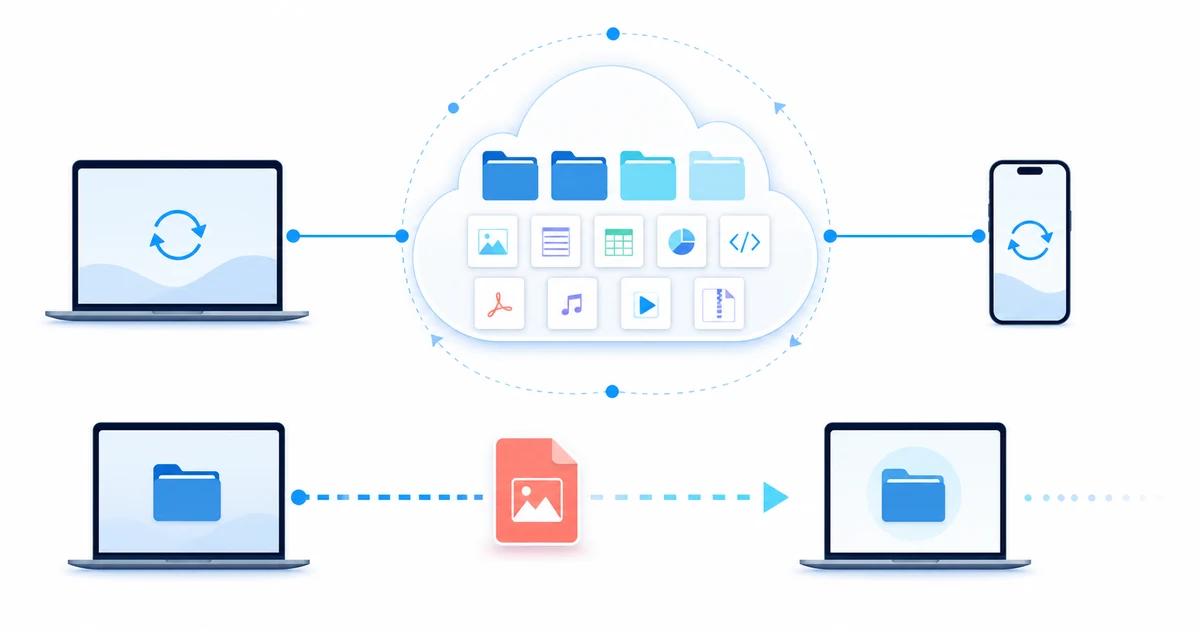
When cloud storage makes more sense
Cloud storage is the better fit when tomorrow’s access matters as much as today’s upload. A photographer maintaining an active client library, a student moving between a laptop and phone, or a small team working from shared project folders needs continuity. For these ongoing projects, the cloud storage vs file transfer choice is really a choice between maintaining a library and repeatedly rebuilding deliveries. Sending a fresh transfer every time someone changes a file would create duplicate copies and version confusion.
It also helps when organization is part of the work. Folder names, ownership, shared access, and a predictable place for the current version matter more than a single successful download. If that is your situation, read the fuller explanation of how cloud storage works and the practical guide to file storage and sharing.
Do not treat a synced cloud folder as the only copy of irreplaceable data. CISA recommends keeping updated copies of critical data on devices you control, and it advises strong passwords, multifactor authentication, software updates, and least-privilege permissions for cloud accounts.[5]
When a file transfer service is enough
A transfer service is cleaner when the recipient needs a package, not a workspace. Think of a videographer delivering final exports, an accountant sending a completed document set, or a designer handing over production files. In this case, the cloud storage vs file transfer decision favors a defined handoff instead of long-term access. The sender prepares one package, gives the recipient a clear download path, confirms receipt, and closes the handoff.
Temporary retention can be useful here because the file does not need to sit in a permanent shared folder. The trade-off is that the sender must know what happens when a link expires, whether downloads are limited, and how to resend the package if the recipient misses the window.
If your immediate problem is an attachment that will not fit in email, the guide to sending large files online covers the delivery steps. This article stays with the choice between a durable file library and a transfer-led workflow.
Choose by what happens after delivery
A useful cloud storage vs file transfer decision starts with the file’s next action. Work through these questions before comparing plan pages:
- Will anyone edit or replace the file? Use cloud storage when people need a continuing source of truth.
- Does the recipient only need the finished package? A transfer service keeps the handoff simpler.
- Will the same files go to different people over time? Storage avoids preparing repeated transfers, but access must be reviewed.
- Should access end on a known date? A service with an explicit expiry control may fit, regardless of category.
- Do you need delivery logs, automated retries, or scheduled exchanges? Look at managed file transfer rather than a basic consumer sharing page.[2]
For a working project, the answer may change by stage. Keep source material and current drafts in cloud storage, then create a separate transfer for the approved final package. That gives collaborators continuity without exposing the entire working folder to the final recipient.
Compare controls, not labels
The words “cloud storage” and “file transfer” do not settle the security question. A cloud storage vs file transfer security review should compare the same controls on both sides, not assume that either label guarantees protection. Check the controls attached to the exact plan you will use: account protection, encryption in transit and at rest, recipient authentication, link scope, expiry, revocation, activity records, and recovery options.
Access design matters too. A long-lived shared folder may expose future files if permissions are too broad. A transfer link may be forwarded beyond the intended recipient if it allows anonymous access. CISA notes that collaboration expands the attack surface and recommends limiting account permissions to people who need the documents.[5]
For sensitive work, write down who owns the file, who may receive it, when access should end, and which copy must be retained. A product label cannot answer those questions for you.
Check the cost over the file’s lifetime
Storage plans usually charge for capacity, users, or both. Transfer plans may limit transfer size, total traffic, link lifetime, download count, or monthly volume. The cheaper option for a 20 GB one-time delivery may become expensive if the same files must stay online for a year. A low-cost storage plan may be poor value if you only need a recipient to download one package today.
Include the human cost. Rebuilding expired transfers, cleaning duplicate folders, chasing missing downloads, and correcting access mistakes all take time. A fair cloud storage vs file transfer cost comparison includes that administrative work along with storage and traffic limits. Compare the full workflow rather than the headline allowance.
When using both is simpler
Many people do not need to choose one category for everything. A hybrid workflow is often easier:
- Keep source files, drafts, and approved masters in an organized cloud library.
- Create a separate delivery package containing only what the recipient needs.
- Send that package through a controlled link or transfer service.
- Confirm receipt, then remove the temporary delivery when its purpose ends.
- Retain the master according to your backup and records policy.
This separation reduces accidental oversharing. It also leaves the working library intact if a delivery link expires or the recipient asks for another copy.
Test the choice against a real task
Feature lists are easier to judge when you attach them to a specific job. The following scenarios show why the same person may choose differently from one project to the next.
A designer delivering final artwork
The designer has working files, font notes, review exports, and two approved production files. The working material belongs in cloud storage because it may need another revision and should remain organized. The client only needs the approved package. A separate transfer prevents draft files and unrelated client work from being exposed.
In this cloud storage vs file transfer example, both tools have a clear boundary. Storage holds the project record. The transfer contains a deliberate snapshot of the final deliverables. If the client requests a correction, the designer updates the working library and creates a new labeled delivery rather than silently replacing a file the client may already have downloaded.
A family collecting photos from several phones
A temporary transfer can gather or deliver a batch, but it becomes awkward when people want to add photos over several months. A shared storage folder is easier for continuing contributions, provided someone owns the folder structure and reviews who still has access.
Critical photos should also exist outside the shared account. A local drive or another independent backup protects against accidental deletion, account trouble, and synchronization mistakes. The shared folder is the convenient working copy, not proof that every photo can be recovered.
A video editor sending one large export
The editor may keep source footage and project files in long-term storage, but the recipient needs only one approved video. A transfer-led delivery avoids granting access to the source library. The editor should confirm the recipient’s deadline, expected file name and size, and whether the link will remain active long enough for a retry.
Here the cloud storage vs file transfer decision turns on scope. The full project may be hundreds of files; the delivery is one asset. Keeping those jobs separate makes the recipient’s experience simpler and reduces the chance of sharing material that was never approved.
A small team editing the same documents
Repeated transfers are a bad fit for live work. People may download different copies, rename them inconsistently, and send edits back through separate channels. A controlled shared folder gives the team a known location for current files and lets the owner remove access when a contractor leaves.
The team still needs rules. Decide who may create public links, who owns final records, and how deleted or overwritten files are recovered. Collaboration features reduce copy chaos, but they do not replace access reviews or an independent backup.
Write the requirements before comparing plans
A short requirements note keeps the product comparison honest. Without one, it is easy to choose the service with the largest advertised allowance and discover later that its link lifetime, recipient flow, or ownership model does not fit.
Retention
Write down how long the authoritative copy must remain available. “Until the client downloads it” points toward transfer. “For the life of the project” points toward storage. If legal, contractual, or records rules apply, use those requirements rather than a convenient default.
Ownership
Identify the account that should own the files after an employee, freelancer, or project lead leaves. Personal ownership may be acceptable for a personal library, but team records usually need an account and offboarding process the organization controls.
Recipient experience
Check whether recipients need an account, whether they can preview before downloading, and what happens on a slow or interrupted connection. Test the exact recipient path instead of relying on the sender’s dashboard. A cloud storage vs file transfer review that ignores the receiving side is incomplete.
Change and version handling
Decide whether a file can change after it is shared. Ongoing collaboration needs clear version behavior and a way to recover from unwanted edits. A final delivery should usually be stable, labeled, and accompanied by enough context for the recipient to identify it.
Access end date
Every external share should have a reason to remain open. Record the expected review or removal date even if the service does not enforce one automatically. This is especially important for permanent storage links, which are easy to forget after the conversation moves on.
Use a compact decision worksheet
You can make the cloud storage vs file transfer choice with a one-page worksheet. Fill it out for the actual file set, not for every possible future use:
| Requirement | Your answer | What the answer suggests |
|---|---|---|
| Purpose | Working library or finished delivery? | Library favors storage; delivery favors transfer |
| Lifetime | Hours, days, months, or indefinite? | Short periods may suit transfer; long retention needs storage |
| Changes | Will files be edited or replaced? | Continuing changes favor storage |
| Audience | Known collaborators or one-time recipients? | Collaborators need managed access; recipients need a clear handoff |
| End of access | Expiry, manual revocation, or ongoing? | Choose a service that exposes the required control |
| Recovery | Where is the independent copy? | Neither option should be the only copy of critical data |
Two answers deserve extra attention. If the file will change, define which location is authoritative. If the file is critical, identify a recoverable copy that does not depend on the same account and workflow.
Plan for export and cleanup
The first choice does not have to last forever. Projects end, teams change, and plan limits move. What matters is whether you can leave cleanly without losing the record or leaving forgotten links behind.
Before adopting a storage service for ongoing work, test bulk download or export with a non-sensitive sample folder. Check whether file names, folder paths, and timestamps remain useful. Confirm how shared links behave when a file moves or an account is closed. If a provider-specific document format is involved, identify the export format you would keep.
For a transfer service, review the cleanup path. Find out whether the sender can revoke a live transfer, how expired deliveries appear in the account, and whether activity records remain available after the payload is removed. Do not assume that expiry deletes every related record immediately.
A sensible cloud storage vs file transfer exit check has three parts: export the authoritative files, remove external access that is no longer needed, and verify the destination copy before deleting anything. Keep a record of what moved and who approved the cleanup when the files belong to a team or client.
Review the workflow after the first use
The first real delivery will expose details that a pricing page cannot. Ask whether the recipient understood what to do, whether the upload recovered cleanly from interruption, whether permissions matched the intended audience, and whether the sender could find and close the share afterward.
If people keep rebuilding transfers for files that remain active, move that work into an organized storage space. If a permanent shared folder is used only to hand over final packages, narrow the workflow to dedicated deliveries. The cloud storage vs file transfer boundary should follow the work, not habit.
Record one or two rules that would prevent the same friction next time. Examples include a file-naming pattern for final deliveries, a seven-day access review, or a requirement to keep project masters in a team-owned folder. Small rules are easier to follow than a long policy nobody opens.
Common choice mistakes
Using a permanent shared folder for a one-time handoff
The recipient may keep access longer than intended or see later additions. Send a narrow package instead, or use a dedicated folder and remove access after delivery.
Using temporary transfer links as an archive
An expired link is not a storage system. Keep the authoritative copy somewhere designed for retention and recovery.
Choosing by maximum file size alone
A generous limit does not tell you about upload recovery, recipient friction, expiry, download rules, account controls, or the price of repeated use.
Assuming synchronization equals backup
Synchronization is useful for access, but deletion or unwanted changes may propagate. Keep an independent copy of critical files and test how restoration works.[5]
Where Filekub fits
Filekub combines browser-based cloud storage with link sharing, so it can support an organized library and selected file delivery from the same account. Use the storage side for files you expect to keep, then share only the items the recipient needs. The right workflow still depends on your retention, access, and backup requirements.
Open Filekub to compare that workflow with the job you need to complete. For a one-time send, keep the shared scope narrow; for ongoing work, maintain a clear folder structure and review access periodically.