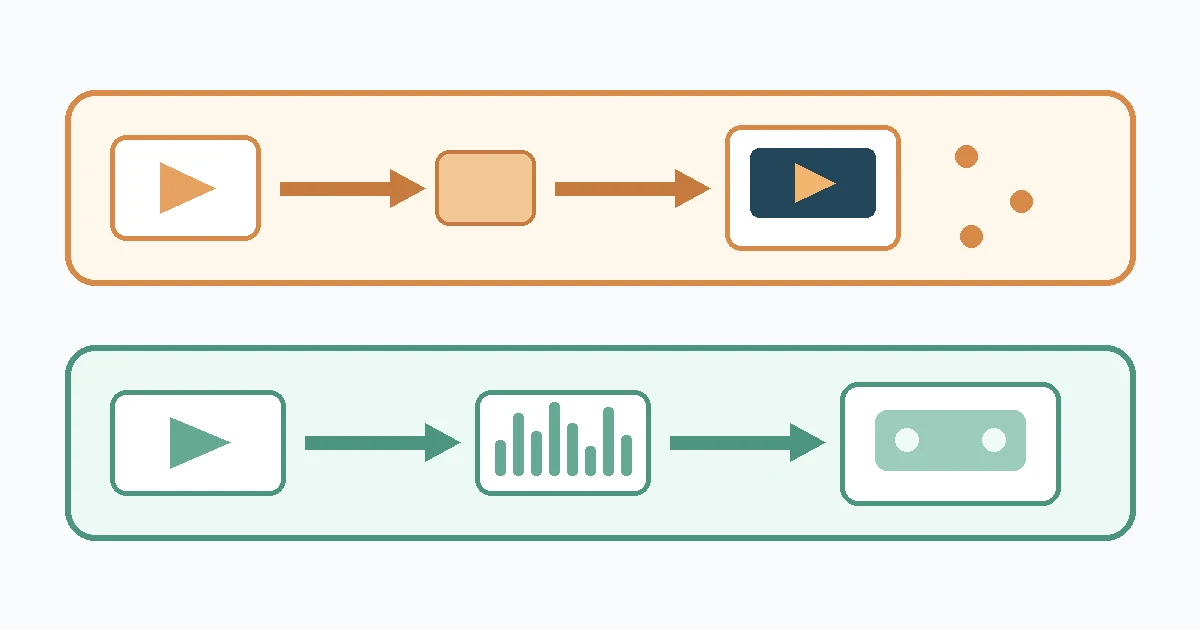
To share large video files with clients, split the handoff into two jobs: send a smaller review proxy for comments, then deliver the approved final master as a separate, clearly named file. Estimate the upload before the deadline, wait for the service to confirm completion, test the recipient link, and use a checksum when exact byte-for-byte delivery matters.
This workflow for video files prevents a lightweight approval copy from being mistaken for the final deliverable. It also gives the client a simple path: review first, approve, then download the master they actually need.
How to share large video files with clients
- Confirm the required video files and supporting deliverables. Record the approved duration, resolution, frame rate, codec, container, audio layout, caption files, naming convention, and deadline.
- Export a review proxy. Make the review copy of the video files small enough for convenient review and label it so nobody can mistake it for the master.
- Collect approval against one version. Ask for time-coded notes and freeze that review version once it is approved.
- Export and inspect the final master. Inspect the final video files by playing the opening, several points through the program, and the ending. Confirm picture, audio, captions, and duration.
- Estimate the transfer. Use the final byte size and a measured upload speed. Start early enough for a retry.
- Upload and wait for completion. Do not send a link while the progress indicator is still moving or the service is processing the file.
- Test the client path. Open the exact link in a private browser window or use a permitted test recipient.
- Verify integrity when required. Supply a SHA-256 digest for a master that must arrive byte for byte unchanged.
- Send a concise handoff note. Identify the approved version and video files, the proxy, the master, the expected file size, and any review or retention deadline.
Write the delivery brief before exporting
A transfer of video files can finish perfectly and still deliver the wrong thing. Before export, turn the agreement into a short checklist. “4K video” is not enough if the client also expects a particular frame rate, audio channel layout, color treatment, caption format, or filename.
At minimum, record:
- review-copy purpose and approval contact;
- final resolution, frame rate, codec, container, and audio specification;
- separate caption, poster, thumbnail, or transcript files;
- filename and version convention;
- delivery deadline, time zone, and who confirms receipt;
- whether the client needs one master, several platform exports, or project/source media;
- any contractual, privacy, or approved-service restrictions.
Do not assume that a playback copy is an archive master or that a master is the easiest review file. Ask the client which specification their destination accepts. If the file contains confidential, regulated, or unreleased material, use the service and controls approved for that data.
Separate the review proxy from the final master
Adobe defines proxies as low-resolution copies of high-resolution video files. That idea is useful beyond editing: a review proxy is a lighter copy meant for viewing and comments, while the final master is the approved export in the delivery specification.
| File | Purpose | Priority | Example label |
|---|---|---|---|
| Review proxy | Comments and approval | Convenient playback and clear version identity | campaign-v07-review.mp4 |
| Final master | Publication, archive, or downstream production | Exact agreed technical specification | campaign-v08-approved-master.mov |
“Proxy” does not mean “unfinished.” Check the proxy before sending it. It should represent the current edit, retain the correct aspect ratio and frame rate, and contain audio that can be reviewed. If you add a visible review label or timecode, keep it away from captions and critical graphics.
Do not overwrite the approved proxy with a later cut. Once the client signs off, preserve the reviewed filename and map that approval to the master export. This is more reliable than asking everyone to remember which attachment was “the latest.”
Inspect the master as a deliverable
Export from the approved timeline and check the resulting file itself instead of relying on the edit sequence. Confirm duration, first and last frames, audio presence and channel layout, caption sidecars, and any required color metadata. A spot check is useful, but requirements or high-value work may justify watching the full program.
Name and package the approved files
Use a delivery folder that contains only what the client needs. Keep scratch renders, autosaves, cache files, and rejected cuts out of it. A small manifest can list each filename, its purpose, byte size, and SHA-256 digest if you are using one.
Prefer version names that sort predictably, such as project-v08-approved-master.mov. Avoid names such as final-final2.mov. If several video files travel together, an archive can preserve the folder structure, but already compressed video may not become much smaller. Compression is packaging, not proof that the files are correct.
Open the package of video files once before upload. Check that relative links, sidecar captions, and supporting documents are present. Keep your working copy until the client confirms receipt and your retention agreement allows deletion.
Plan the upload window
Upload planning uses the upstream rate, not the usually larger download number. The FCC defines typical upload speed as the rate at which data is sent from a device and notes that plan figures and observed speeds can differ.
Use the Filekub file transfer time calculator with the total size of the video files and a measured upload result. The ideal relation is:
time in seconds = file size in bits / upload speed in bits per second
A 40 GB master at 20 Mbps has an ideal transfer time of 4 hours 26 minutes 40 seconds. That is a lower-bound calculation, not a delivery promise. Real throughput can be lower, and the service may need additional time to confirm or process the upload.
For a client deadline, leave room for a failed attempt, local disk reading, network variation, service processing, link testing, and the client’s download. If the estimate already reaches the deadline, reduce the review proxy, move the final handoff earlier, or agree on another approved delivery route. Do not quietly substitute the proxy for the master.
If the estimate looks wrong, check Mbps versus MB/s. For a broader diagnosis, use the upload speed troubleshooting checklist.
Verify the upload and recipient path
A progress bar for video files reaching 100 percent is not the whole handoff. Wait for the service to show its completed state, then compare the displayed filename and size with your delivery record. If the platform changes names or packages folders, make that clear in the handoff note.
Test the exact link as the client will receive it. A private window is useful for a public recipient flow because it does not inherit your signed-in session. Confirm that the intended video files appear and that a test download starts. Stop if the link reveals unrelated folders or requires access the client does not have.
Send the link to the verified recipient through the agreed channel. For sensitive work, follow the client’s policy and the access controls of the approved service. NIST guidance treats information exchange as a lifecycle that should be planned, established, maintained, and discontinued according to risk. Delivery is not finished merely because a URL was copied.
Use a checksum when exact delivery matters
For an archive master, broadcast handoff, legal deposit, or any delivery where the bytes of the video files must remain unchanged, calculate SHA-256 before upload and save the digest in the manifest. Ask the recipient to calculate SHA-256 on the downloaded file and compare all characters.
NIST’s Secure Hash Standard explains that digests can detect whether a message changed after the digest was generated. A matching digest gives strong evidence that the recipient has the same bytes you hashed. It does not prove that the content is correct, identify who created it, or show that a file is free of harmful code.
Use the browser checksum calculator or follow the operating-system commands in How to Verify a Download With SHA-256. Communicate the expected digest through a trusted project record or channel so the client knows which value is authoritative.
Keep revisions from becoming a guessing game
Client delivery of video files often fails through version confusion rather than network failure. Keep one review thread per version. Ask reviewers to include the filename and timecode with each note, then close that version when the decision maker approves it.
- Never reuse the same filename for different bytes.
- Keep “review,” “approved,” and “master” as deliberate states, not casual adjectives.
- Record who approved the cut and when.
- Replace or withdraw obsolete links when the service and project policy allow it.
- Confirm receipt before removing your delivery copy.
A brief handoff message might say: “Review approved against campaign-v07-review.mp4. Final delivery is campaign-v08-approved-master.mov, 40,000,000,000 bytes. SHA-256 is in the attached manifest. Please confirm download and checksum by 17:00 UTC on 3 September.” Use real values from your export rather than copying this example.
Where Filekub fits
Filekub can be used as a browser-based route to upload and share video files by link. The live guest flow was checked before this local draft: a recipient could open a shared-file page and start the download without using the sender’s signed-in session. This observation does not establish that Filekub is suitable for every contract, regulatory regime, or confidential production.
If Filekub meets the project’s requirements, open Filekub, upload the approved delivery package, wait for the completed state, and test the resulting share link before sending it. For general oversized-file choices, read How to Send Large Files Online When Email Attachments Are Too Small. For risk-sensitive client work, use the broader client file-sharing workflow.
Frequently asked questions
Should I send the review proxy or final master first?
When sharing video files, send the review proxy for comments unless the client has already approved the cut or explicitly needs the master for technical testing. Label both files clearly. Approval of a proxy should map to a specific final export.
Does zipping a video make it much smaller?
Often not. Common delivery video codecs already compress the media. An archive can keep several files together, but measure the result rather than assuming a major size reduction.
How early should I start a large video upload?
Calculate the ideal time from the final byte size and measured upload speed, then add room for lower real throughput, service processing, verification, and at least one retry when the deadline is important.
How can the client confirm the final master downloaded correctly?
For exact byte-level verification, both sides can calculate SHA-256 and compare the complete digest. Matching values detect transfer changes, but they do not replace editorial or technical quality control.
Can a review proxy be the final deliverable?
Only if the client explicitly accepts that file and specification as final. Do not assume that a small playback copy satisfies an agreement for a high-quality master.